Special:B0C3QXM4H9
Code:4549550270243
Brand:ELECOM
Specification:TK-FS10UMKBK
Product color: Black
Size information: Mini size
Product size: Height 3.3cm, Width 13.6cm, Depth 26.7cm
Product weight: 310g
About this product
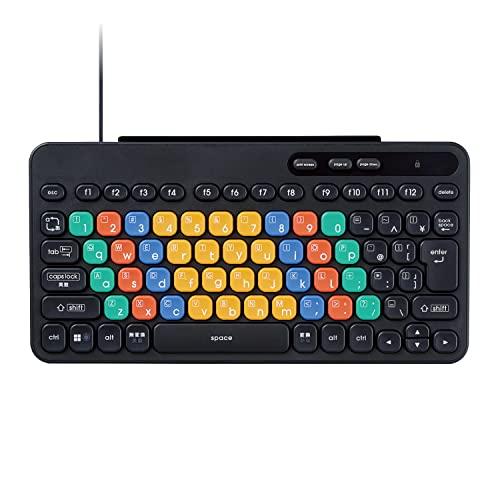
This is a computer learning keyboard KEY PALETTO, which makes it fun to learn correct key input.
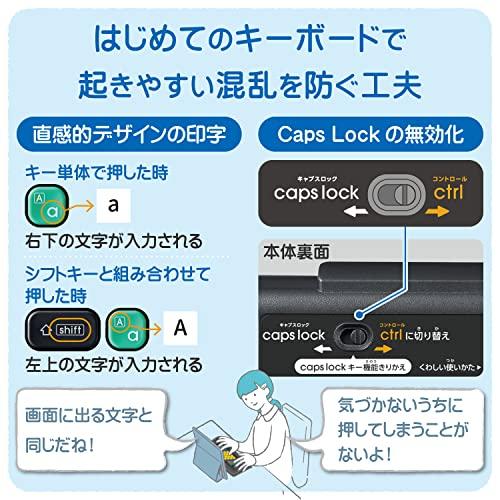
It has printed designs that match the actual characters to be input, preventing confusion for children unfamiliar with the alphabet.
This product was supervised by Vice President Susumu Kanesou of Osaka Electro-Communication University, who has extensively researched and proposed programming language development and teaching methods.
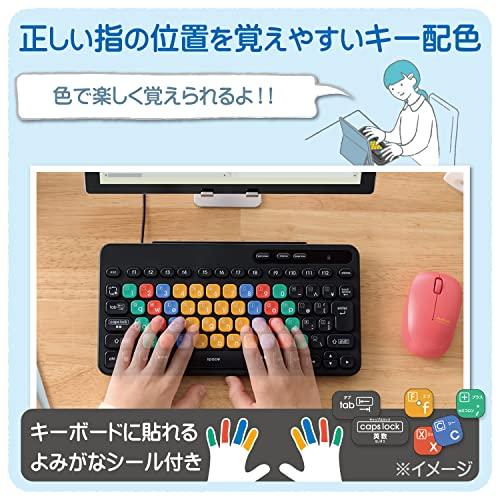
It features clear coloring close to primary colors, making it fun for fingers to learn key presses.
Even people with color vision deficiencies that make color discrimination difficult can easily distinguish differences in color, as the color balance has been adjusted.
› See more Brand: ELECOM
Compatible devices: Windows PCs with USB ports, Chromebook
Connection technology: USB-A
Keyboard description: Membrane
Recommended uses: Education, Personal, Programming
Features: Lightweight
Color: Black
Number of keys: 84
Style: Wired
Product dimensions: 27.6cm length x 13.6cm width x 3.3cm height
About this product
This is a computer learning keyboard KEY PALETTO, which makes it fun to learn correct key input.
It has printed designs that match the actual characters to be input, preventing confusion for children unfamiliar with the alphabet.
This product was supervised by Vice President Susumu Kanesou of Osaka Electro-Communication University, who has extensively researched and proposed programming language development and teaching methods.
It features clear coloring close to primary colors, making it fun for fingers to learn key presses.
Even people with color vision deficiencies that make color discrimination difficult can easily distinguish differences in color, as the color balance has been adjusted.
› See more
Shipping size: Height 29.2cm, Width 18.4cm, Depth 3.6cm
Shipping weight: 490g
Specifications
Connector shape: USB-A plug
Connection method: Wired USB
Supported models: Windows PCs with USB ports, Chromebook
Supported OS (Windows): Windows 11/10
Supported OS (Others): ChromeOS
Key layout: Japanese layout
Number of keys: 84 keys
Key type: Membrane
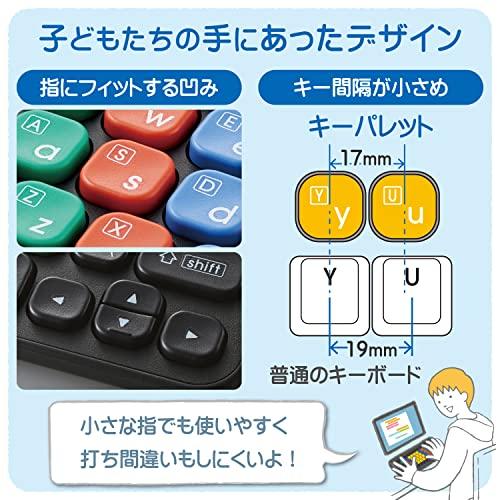
Key pitch: 17mm
Key stroke: 2.5mm
Power: One AA alkaline battery, one AA manganese battery, or one AA nickel-metal hydride secondary battery
Cable length: Approximately 1.5m
Size classification: Mini size
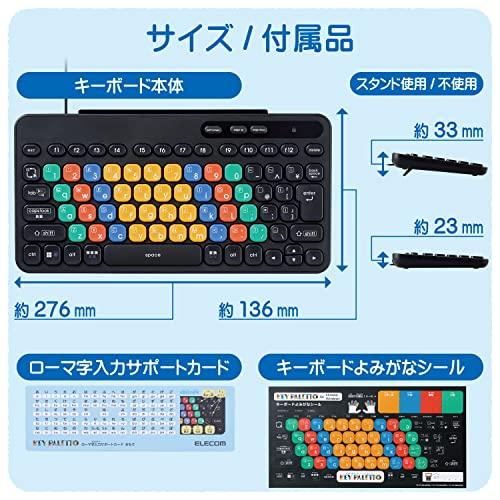
External dimensions: Approximately 267mm width x 136mm depth x 23mm height (excluding stand), 267mm width x 136mm depth x 33mm height (with stand)
Weight: Approximately 315g including cable
Contents: Keyboard main unit 1, Roman character input support card 1, Hiragana stickers 1
VCCI: Class B compliant
Color: Black
Warranty period: 1 year
Description
This is a computer learning keyboard KEY PALETTO, which makes it fun to learn correct key input.
It has printed designs that match the actual characters to be input, preventing confusion for children unfamiliar with the alphabet.
This product was supervised by Vice President Susumu Kanesou of Osaka Electro-Communication University, who has extensively researched and proposed programming language development and teaching methods.
It features clear coloring close to primary colors, making it fun for fingers to learn key presses.
Even people with color vision deficiencies that make color discrimination difficult can easily distinguish differences in color, as the color balance has been adjusted.
The main body color is charcoal gray, which is less likely to show dirt and scratches.
It is a compact design with a 17mm pitch, perfect for children's hands and easy to use with tablets.
It adopts a newly designed membrane system that allows for smooth typing with light force.
By changing the shape of keys according to usage frequency and functions, it is designed to prevent children who are just learning touch typing from pressing the wrong keys.
It uses durable keys that can withstand up to 5 million keystrokes.
The structure prevents pens or rulers from being inserted into the gaps between keys, making it resistant to mischief.
The rounded key shape and familiar tactile feel are designed to be appealing to children.
It includes a Roman character input support card and a card stand for placing notes.
Templates for creating original cards that fit the card stand, and data for dedicated learning cards such as Scratch, are freely available.
It features a unique layout incorporating functions specialized for programming and computer learning.
To avoid confusion caused by mispresses, less frequently used functions are eliminated, making learning keyboard operation more enjoyable.
It is equipped with a Caps Lock disable switch that deactivates the Caps Lock function, which can be accidentally enabled.
The Caps Lock disable switch is designed to be easy for small fingers to operate and clearly shows the lock status.
Includes a Hiragana sticker to attach to the keyboard to help memorize key names and readings.
The stickers are high quality, with almost no change in tactile feel, and can be peeled off after learning.
The back of the main unit has a name space to prevent loss or misplacement.
A keyboard stand that tilts the keyboard by about 10 degrees makes typing easier and reduces strain on hands and arms.
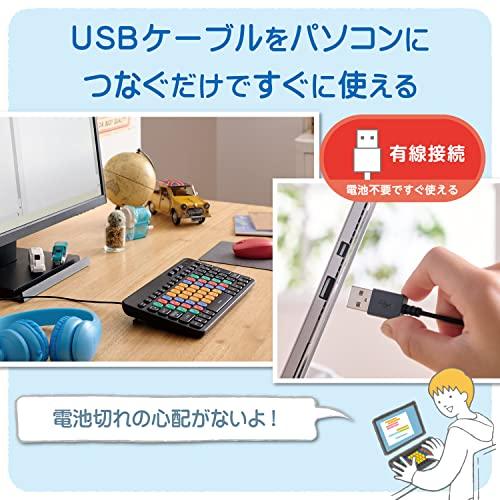
No complicated setup is needed; simply connect via USB cable to start using immediately.
It is powered by the computer, so batteries are not required, and there is no worry about running out of power.
VCCI Class B compliant, designed to minimize radio wave interference.
Equipped with antibacterial processing that suppresses and inhibits bacterial growth, keeping it clean. (Antibacterial range: keyboard housing and printed parts)
This product has the performance to inhibit or suppress bacterial growth on its surface, and complies with antibacterial testing standards set by the Japan Standards Association (JSA).
It meets at least one of our internal environmental standards and displays the 'THINK ECOLOGY' mark.
It is environmentally conscious, with packaging made only of paper, cardboard, and plastic bags.
Inquiries about the product
ELECOM General Information Center
TEL. 0570-084-465
FAX. 0570-050-012 88 Business hours / 10:00-19:00, open year-round
Customer inquiries about the product
Introduction to the Brand: First Keyboard 'KEY PALETTO'
A keyboard developed in collaboration with ELECOM, a specialist in programming education, designed to be easy for children to use.
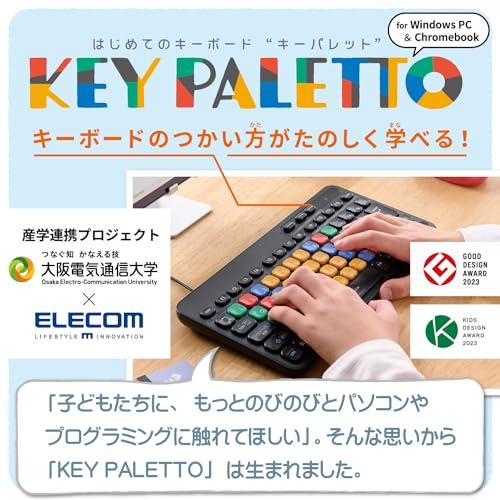
KEY PALETTO, a computer learning keyboard that makes it fun to learn correct key input, was developed over three years under the supervision of Vice President Susumu Kanesou of Osaka Electro-Communication University, who has extensively researched programming language development and teaching methods.
How KEY PALETTO was created
"Children should be able to experience computers and programming more freely." With that wish, 'KEY PALETTO' was born.
From the shape, layout, font design of each key, to the internal structure, developers visited learning sites repeatedly and worked closely with programming education experts to create it.
Children are often unfamiliar with using all five fingers and inputting in Roman characters, so they often struggle with typical keyboards because they cannot input characters as intended.
Therefore, the focus was on intuitive usability and fun learning functions. Of course, it is also a confident product with a lively design.
For a first keyboard, definitely choose 'KEY PALETTO'.
With a keyboard that makes learning fun, foster children's motivation to learn.
Four types to choose from, matching your device
Vice President of Osaka Electro-Communication University. Specializes in information science education from elementary to university level, extensively researching and proposing programming language development and teaching methods. Developed educational programming languages Dr. Little and the educational programming environment Bit Arrow, participated in formulating curricula for elementary and high schools, and developed training materials for high school teachers. For this product, the design emphasizes ease of use for children and ease of handling for adults supervising programming learning, with supervision by the team including Vice President Susumu Kanesou.
Fun-filled features to learn how to use the keyboard easily
Common issues when children use a typical household keyboard
Difficulty understanding due to unfamiliar keyboard operation during learning
Misinput or misoperation causing confusion
Loss or breakage problems
With such concerns, KEY PALETTO helps. It makes learning how to use a keyboard fun.
It has clear, primary-color-like coloring, making it fun for fingers to learn key presses. Even people with color vision deficiencies that make color discrimination difficult can easily distinguish differences in color.
It has printed designs that match the actual characters to be input, preventing confusion for children unfamiliar with the alphabet.
The structure prevents pens or rulers from being inserted into the gaps between keys, making it resistant to mischief.
| Product # |
202506110124344549550270243 |